> For the complete documentation index, see [llms.txt](https://designsystem.dubai.ae/llms.txt). Markdown versions of documentation pages are available by appending `.md` to page URLs; this page is available as [Markdown](https://designsystem.dubai.ae/components/cards/video-card.md).
# Video Card
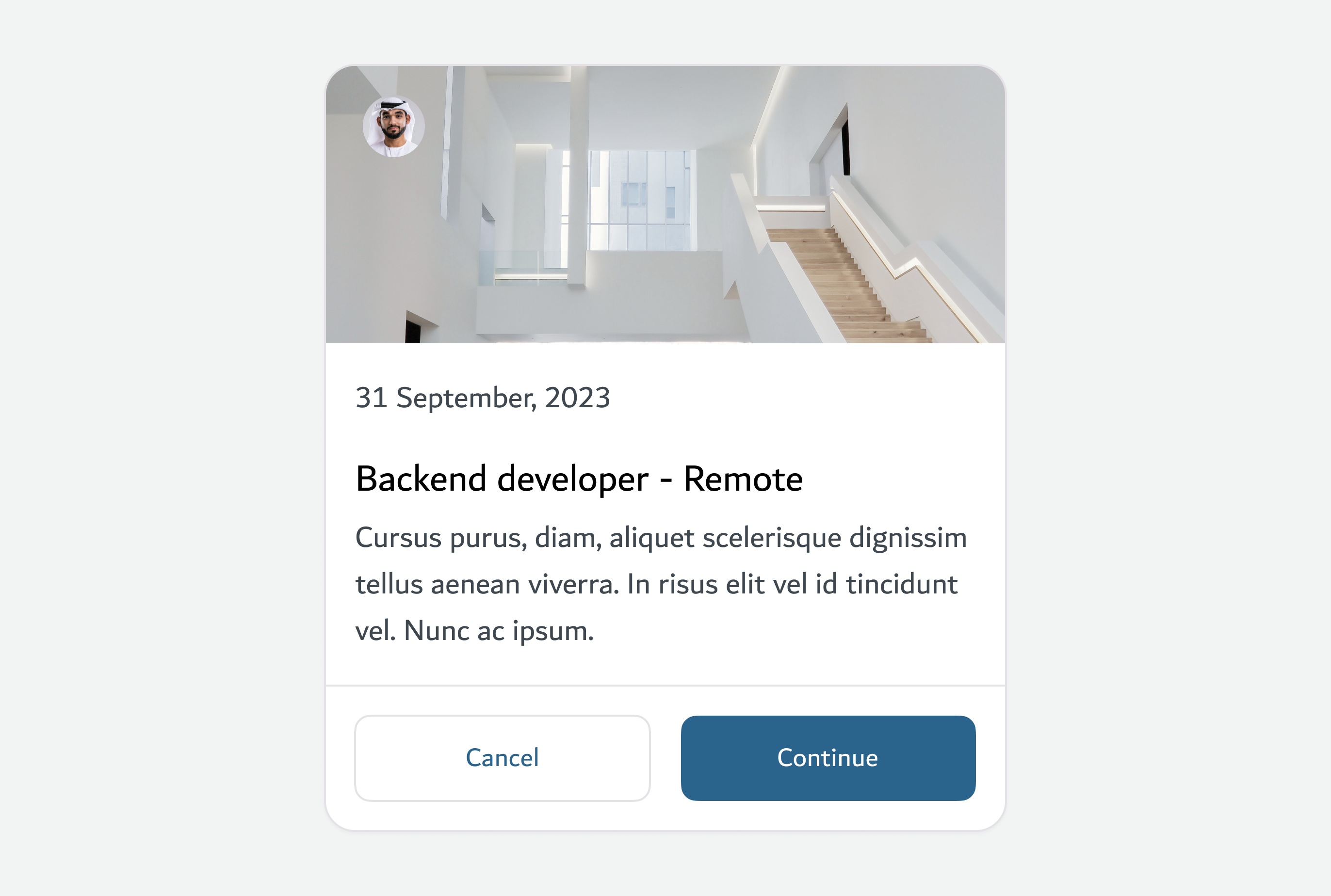
Video cards deliver key video content with supporting details and actions in a compact, engaging layout.
## Overview
## Usage
### When to use this component?
A Video Card is used to promote or preview video content within a website or application. It’s ideal for media libraries, learning platforms, or landing pages where users can engage with visual media directly or be directed to a detailed video page.
### How it works
The card typically includes a thumbnail image, play icon overlay, title, and optional description or metadata (e.g., duration or category). Clicking the card either plays the video in-place or redirects the user to a dedicated video screen. This format encourages quick discovery and intuitive playback.
### Code
{% tabs %}
{% tab title="Vanilla Js" %}
```jsx
```
{% endtab %}
{% tab title="React" %}
```jsx
```
{% endtab %}
{% tab title="Vue" %}
```jsx
```
{% endtab %}
{% tab title="Angular" %}
```jsx
```
{% endtab %}
{% endtabs %}
### Properties
| Prop | Type | Description |
| ---------------------------- | ------ | ----------------------------------------------------------------- |
| `image_src` | string | URL of the image displayed in the card. |
| `image_alt` | string | Alternate text for the image for accessibility. |
| `header_text` | string | Header title text shown on the card. |
| `date_text` | string | Date or subtitle text shown under the header. |
| `body_text` | string | Main content or description text displayed on the card. |
| `left_button_name` | string | Text for the left action button. |
| `left_button_href` | string | URL for the left action button link. |
| `left_button_rel` | string | Rel attribute for the left button (e.g. `"noopener noreferrer"`). |
| `left_button_start_icon` | string | Icon name to show before left button text (optional). |
| `left_button_end_icon` | string | Icon name to show after left button text (optional). |
| `left_button_data_fancybox` | string | Data attribute for fancybox integration on left button. |
| `left_button_target` | string | Target attribute for left button (`"_blank"`, `"_self"`, etc). |
| `right_button_name` | string | Text for the right action button. |
| `right_button_href` | string | URL for the right action button link. |
| `right_button_rel` | string | Rel attribute for the right button. |
| `right_button_start_icon` | string | Icon name before right button text (optional). |
| `right_button_end_icon` | string | Icon name after right button text (optional). |
| `right_button_data_fancybox` | string | Data attribute for fancybox on right button. |
| `right_button_target` | string | Target attribute for right button. |
| `file_size` | string | Text label showing file size (if applicable). |
| `file_type` | string | Text label showing file type (if applicable). |
| `custom_class` | string | Additional CSS class(es) to customize styling. |
| `component_mode` | string | Optional mode to alter card style or behavior (if implemented). |
## Anatomy
### Anatomy Options
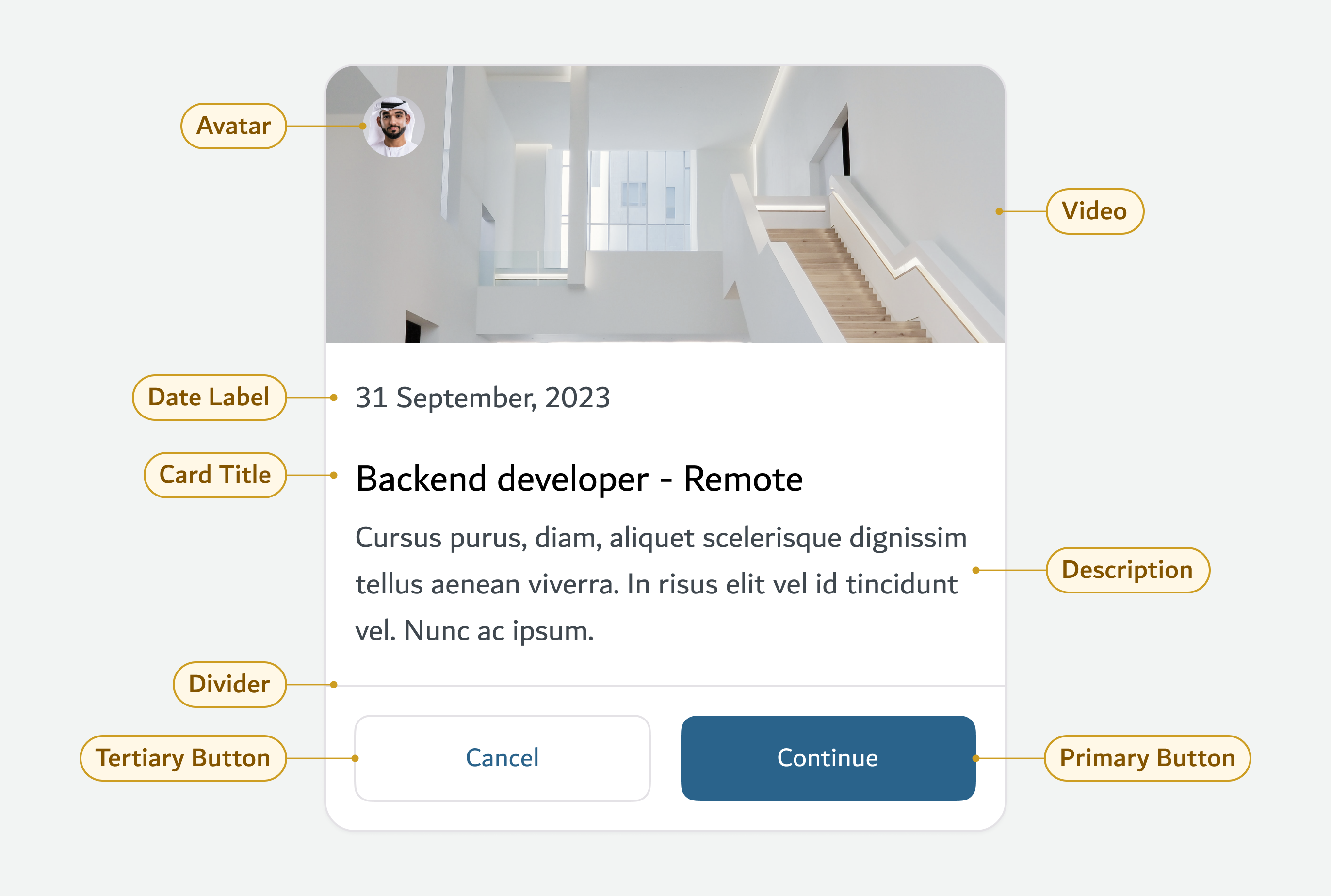
**Avatar**: Represents the author, speaker, or contributor associated with the video.
**Video**: A thumbnail or preview still of the video content; serves as a visual hook.
**Date Label**: Displays the publishing or recording date for quick context.
**Card Title**: Communicates the main subject or title of the video, drawing user attention.
**Description**: A short summary or context related to the video content.
**Divider**: Separates content from actions, maintaining visual hierarchy.
**Primary Button**: A main action (e.g., Continue or Watch), driving user engagement.
**Tertiary Button**: A low-priority action (e.g., Cancel), offering users a non-primary route.
***
## Dos and Don'ts
| Dos | Don'ts |
| ------------------------------------------------------------------------------- | ------------------------------------------------------------- |
| Use a high-quality, relevant thumbnail or still for the video. | Don’t use blurry, unrelated, or low-resolution videos. |
| Clearly label the video title and provide a short, meaningful description. | Don’t use vague or overly long titles and descriptions. |
| Include a visible play indicator or call-to-action (e.g., “Watch”, “Continue”). | Don’t make users guess whether the card is interactive. |
| Use consistent styling for buttons and spacing between elements. | Don’t overcrowd the card or use inconsistent visual elements. |
---
# Agent Instructions
This documentation is published with GitBook. GitBook is the documentation platform designed so that both humans and AI agents can read, navigate, and reason over technical content effectively. Learn more at gitbook.com.
## Querying This Documentation
If you need additional information that is not directly available in this page, you can query the documentation dynamically by asking a question.
Perform an HTTP GET request on the current page URL with the `ask` query parameter, and the optional `goal` query parameter:
```
GET https://designsystem.dubai.ae/components/cards/video-card.md?ask=&goal=
```
`ask` is the immediate question: it should be specific, self-contained, and written in natural language.
`goal` is optional and describes the broader end goal you are ultimately trying to accomplish on behalf of the user. GitBook uses it to tailor the answer towards what is most useful for that goal.
The response will contain a direct answer to the question and relevant excerpts and sources from the documentation.
Use this mechanism when the answer is not explicitly present in the current page, you need clarification or additional context, or you want to retrieve related documentation sections.